

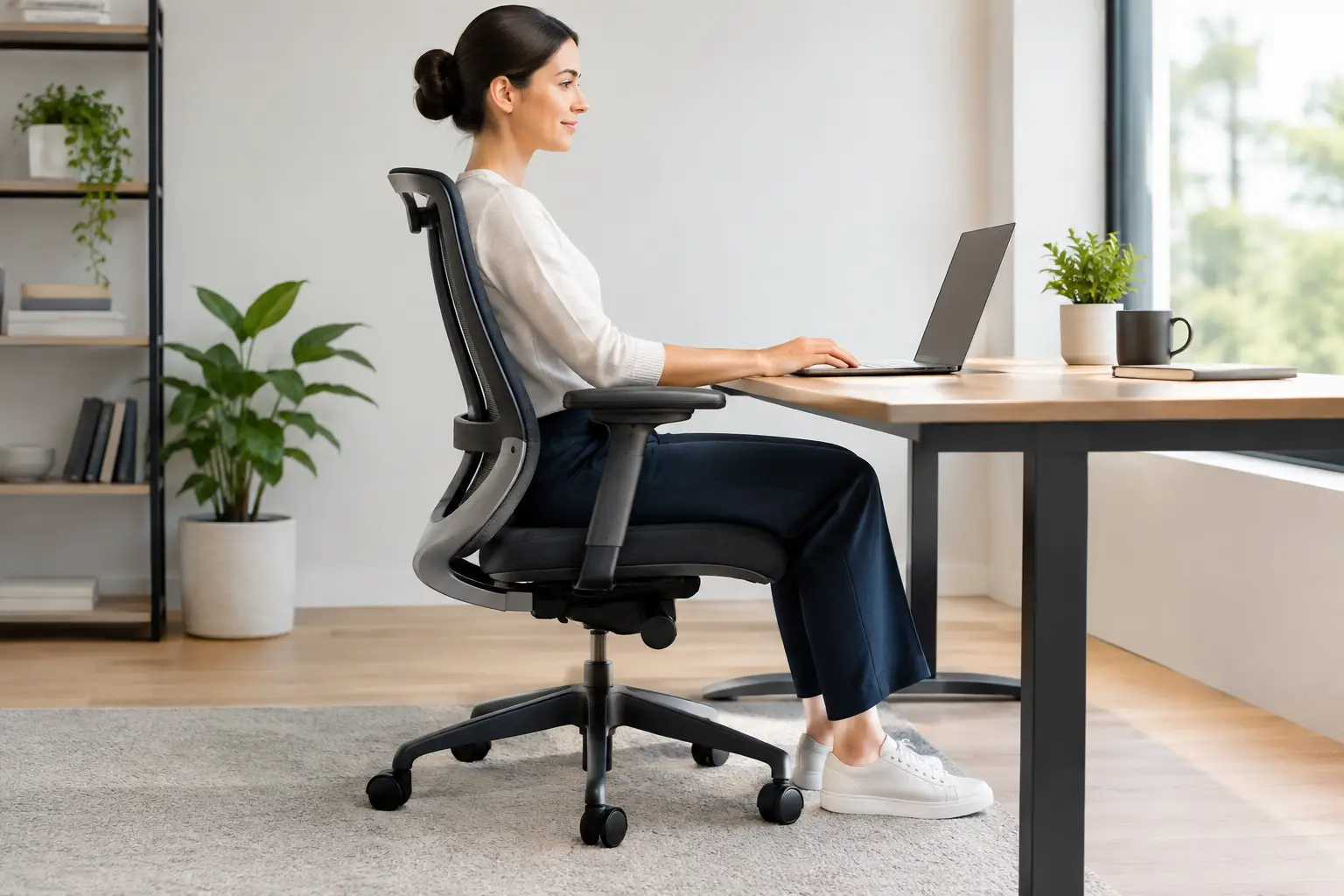
A search for “best office chairs posture” often begins after a familiar workday pattern: your low back feels tight by lunch, your shoulders creep toward your ears during meetings, and standing up from your desk feels harder than it should. A supportive chair can make a meaningful difference, but the right choice is less about one perfect brand and more about how well a chair fits your body, desk, and daily routine.
A chair is not a cure for pain, and no one can hold a perfect posture for eight straight hours. Your body is designed to move. Still, thoughtful support can reduce unnecessary strain, help you change positions more comfortably, and make your workday feel better from the first email to the last.
What the Best Office Chairs for Posture Actually Do
The best office chair is one that helps you maintain a comfortable, supported position without forcing you into a rigid pose. It should meet your body where it is today while giving you room to shift, recline, reach, and reset.
For most people, that begins with adjustable lumbar support. The natural curve of the low back varies from person to person, so a fixed bump in the wrong location can be as uncomfortable as no support at all. Look for lumbar support that can move up and down, and ideally in and out, so it rests in the curve of your low back rather than pressing into your ribs or pelvis.
Seat depth matters just as much. When you sit all the way back, aim for a small gap of about two to three fingers between the front edge of the seat and the back of your knees. A seat that is too deep can encourage slouching or put pressure behind the knees. One that is too shallow may leave the thighs feeling unsupported.
A quality chair also lets you adjust seat height, armrests, recline tension, and backrest position. These features are not extras for people who sit all day. They are the tools that help your workstation fit your body instead of asking your body to adapt to it.
Features Worth Prioritizing
Marketing terms can make every chair sound equally supportive. Focus on the adjustments you will actually use and the areas of your body that tend to feel tired at work.
- Adjustable seat height: Your feet should rest flat on the floor or on a stable footrest, with your knees generally near hip level.
- Adjustable lumbar support: Support should feel present but comfortable, following the low-back curve without creating pressure.
- Seat-depth adjustment: This is especially helpful for taller and shorter adults, who often struggle with standard-size seats.
- Adjustable armrests: Armrests should support relaxed forearms without lifting your shoulders or preventing you from pulling close to the desk.
- Recline and tension control: A chair that reclines with you can reduce the feeling of being locked in one position and may take some load off the spine.
- A stable base and breathable materials: These improve day-to-day comfort and encourage small, natural movements throughout the day.
Mesh, foam, leather, and fabric can all work well. Mesh may feel cooler and provide flexible support, while a cushioned seat may feel better for people who prefer more pressure relief. The best choice depends on your comfort, how long you sit, and whether the chair’s structure still supports healthy alignment.
Start With Fit, Not a Price Tag
An expensive ergonomic chair can be a worthwhile investment, but cost alone does not guarantee comfort. A chair with many adjustments is only helpful if those controls fit your body and are easy enough to use. If possible, sit in a chair before buying it, or purchase from a retailer with a practical return policy.
As you test a chair, sit all the way back and ask a few simple questions. Can your feet reach the floor? Does the lumbar support land in the right place? Can you rest your arms without shrugging? Does the seat edge press into the backs of your legs? Can you recline slightly while still seeing your screen clearly?
Pay attention to how your body feels after 15 to 20 minutes, not just the first minute. Some chairs feel plush at first but create pressure points over time. Others feel firmer yet provide steadier support during a long work session.
Body proportions matter, too. A chair that works beautifully for a six-foot colleague may not work for someone with shorter legs or a narrower frame. If you are petite, look for a lower minimum seat height and a shallower seat. If you are taller, check the seat-depth range, backrest height, and weight capacity. The goal is personal fit, not a chair that is popular online.
Set Up Your Chair for Better Posture
Even the best chair can feel wrong when the desk, monitor, keyboard, and chair are working against one another. Set your chair first, then adjust the rest of your workspace around it.
Begin by sitting back in the chair with both feet supported. Adjust the seat so your hips are level with or slightly higher than your knees if that feels comfortable. Your pelvis should be supported rather than tucked far underneath you. A slight recline, often around 100 to 110 degrees, may feel more natural than sitting bolt upright.
Next, bring the armrests to a height where your elbows can rest lightly near your sides. If armrests hit the desk and keep you too far away from your keyboard, lower them or move them out of the way. The shoulders should feel relaxed, not elevated.
Place the keyboard close enough that you do not reach forward with rounded shoulders. Your monitor should be directly in front of you, with the top of the screen near or slightly below eye level for many users. If you work from a laptop, an external keyboard and mouse can make a major difference because they let you raise the screen without raising your hands.
If your feet do not reach the floor after setting the desk and chair to a comfortable working height, use a footrest. Avoid perching on the front edge of the seat for hours to compensate. That position often creates more tension through the hips, low back, and upper body.
Avoid Chasing Perfect Posture
There is no single posture that every body should hold all day. The most supportive setup still needs movement. Shift your position, stand for a call, walk to refill your water, or gently move your shoulders and neck between tasks. Frequent, comfortable changes are often more helpful than trying to sit perfectly still.
A simple reminder can help: change position before discomfort becomes intense. For some people, that means standing or moving for a few minutes every half hour. For others, a longer reset every hour fits the workday better. Choose a rhythm you can maintain without adding stress to an already busy schedule.
When a Chair Is Not the Whole Answer
A new chair may reduce daily irritation, but persistent pain, tingling, weakness, headaches, or stiffness that limits your movement deserves more individualized attention. Workstation setup is only one piece of the picture. Muscle tension, previous injuries, activity levels, sleep habits, stress, and movement patterns can all affect how your body feels at the desk.
At Whole Health Chiropractic, postural analysis can help identify patterns that may be contributing to discomfort, while gentle spinal adjustments and personalized care may support mobility and comfort. Your care should reflect your unique needs, not a one-size-fits-all checklist.
If sitting has become a daily source of pain or you are unsure which changes will truly help, consider scheduling a consultation with a qualified health professional. A chair should support your workday, but your body deserves support that continues long after you log off.